I've been testing Microsoft Foundry for a few weeks now, and yesterday I found something I wasn't expecting: a side-by-side model comparison tool that runs directly inside Visual Studio Code.
No extra setup. No external platform. No switching between browser tabs. Just pick two models, write one prompt, and watch both responses stream in at the same time.
Quick Context: What Are These Tools?
Microsoft Foundry (formerly Azure AI Foundry) is Microsoft's unified platform for discovering, testing, and deploying AI models. It gives you access to a growing catalog of models from OpenAI, Meta, Mistral, DeepSeek, and others—all from a single place.
AI Toolkit for Visual Studio Code is a free extension that brings Foundry's capabilities directly into your editor. You can browse models, configure system prompts, and interact with them through a built-in playground—without leaving VS Code.
Both are useful on their own. But the feature that caught my attention is the Compare mode inside the AI Toolkit playground.
The Compare Feature: Why It Matters
When you're evaluating which model fits a specific task, the typical workflow is painful: open one model, run a prompt, copy the response, open another model, paste the same prompt, wait again, then try to remember what the first one said.
The AI Toolkit's Compare mode eliminates all of that. You select two models from the catalog, write your prompt once, and both models process it simultaneously. The responses appear side by side in real time.
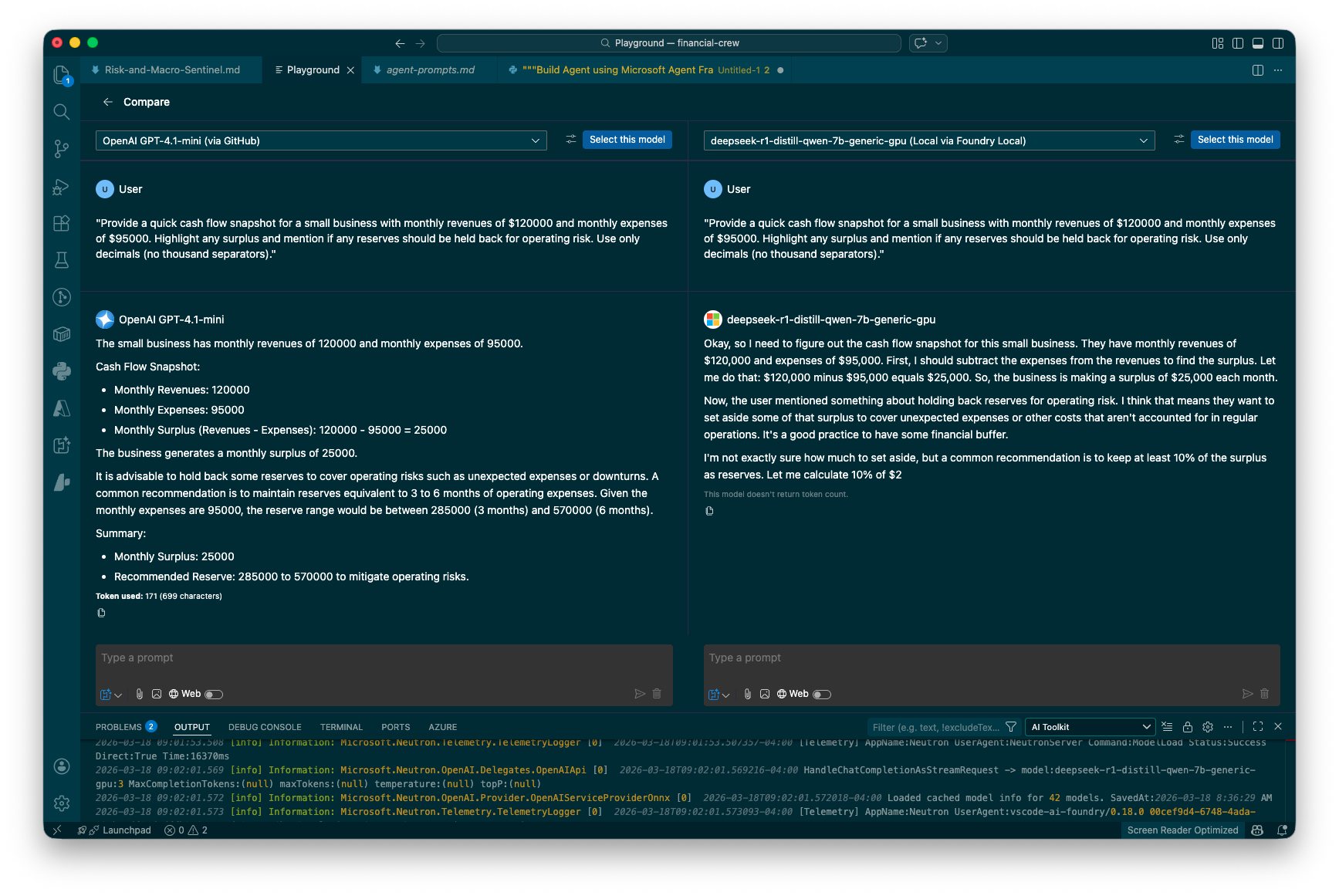
The Compare view in action: OpenAI GPT-4.1-mini (via GitHub) on the left, DeepSeek R1-distill-qwen-7b (running locally via Foundry Local) on the right. Same prompt, same System Prompt, simultaneous execution.
In the screenshot above, I sent both models a financial analysis prompt asking for a cash flow snapshot. The differences are immediately visible:
- GPT-4.1-mini delivers a structured, concise response with bullet points and a clear summary. It gets straight to the numbers.
- DeepSeek R1-distill-qwen-7b (running locally) shows its reasoning process step by step, walking through the calculation before arriving at the answer—and notably, it gets cut off mid-sentence.
That kind of behavioral difference is exactly what you need to see when choosing a model for a specific use case. And seeing it side by side, in the same interface, with the same prompt and system context, makes the comparison fair and fast.
What I Like About This Workflow
- Speed. Both models run simultaneously. You're not waiting twice.
- Fairness. Same prompt, same system prompt, same moment. No variables sneaking in.
- Convenience. It's inside VS Code. If you're already coding, the context switch is zero.
- Local + Cloud. Comparing a free local model against a paid API model in one click is genuinely useful for cost decisions.
When Would You Use This?
A few scenarios where this has already saved me time:
- Deciding whether a smaller model can handle a structured task (like generating reports or parsing data) as well as a larger one
- Testing how different models interpret the same system prompt—some follow instructions tightly, others get creative
- Evaluating response format and style for user-facing outputs where tone matters
- Quick sanity checks when a model gives an unexpected answer—is it the model, or is it the prompt?
Try It Yourself
If you have VS Code installed, the setup takes about two minutes:
- Install the AI Toolkit extension from the VS Code marketplace
- Open the Playground from the AI Toolkit sidebar
- Click Compare at the top
- Select two models and start prompting
You can use GitHub-hosted models for free (with rate limits) or connect your own Azure endpoints. For local models, Foundry Local lets you run open-weight models on your machine with no API key required.
I keep finding useful features buried inside tools I was already using. This one is small but practical—the kind of thing that saves you from building a spreadsheet to track model comparisons.
What's your current workflow for comparing AI models? Are you testing them one at a time, or have you found a better setup?